
Weak, reused, and unmanaged passwords remain a common entry point for cyberattacks. An enterprise password manager provides employees with a secure way to create, store, share, and access credentials while giving IT and security teams centralized visibility and control.
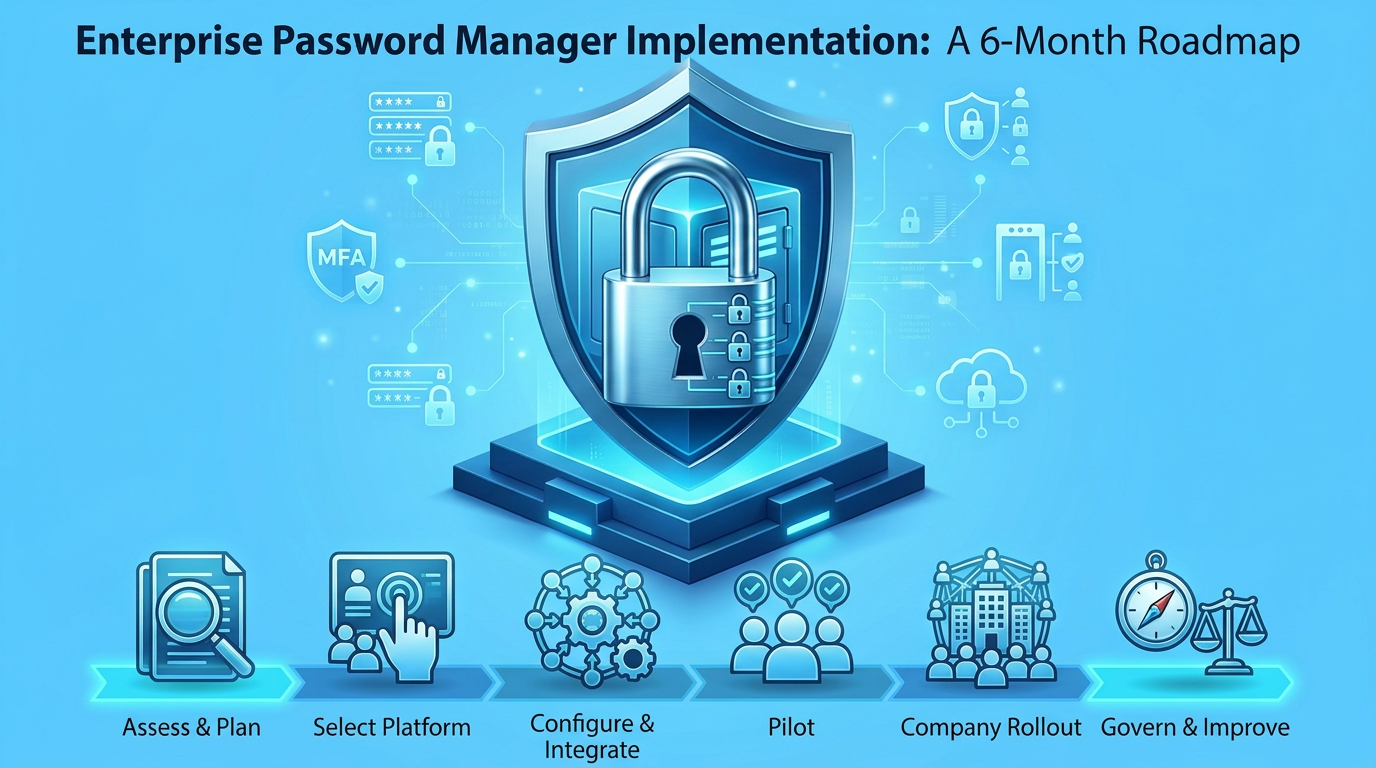
This six-month enterprise password manager implementation roadmap covers everything from assessing credential risks and selecting a vendor to technical configuration, pilot testing, organization-wide deployment, and ongoing governance.
Enterprise password managers use encrypted vaults, role-based access controls, MFA, SSO, SCIM provisioning, and audit logging to strengthen credential security. NIST also recommends password managers for generating and storing unique passwords and emphasizes MFA for protecting sensitive accounts.
Why Enterprises Need a Password Manager
Unlike personal password managers, enterprise solutions provide centralized administration and security controls for managing employee credentials, shared passwords, service accounts, and sensitive secrets.
Key business benefits include:
- Reducing weak passwords and password reuse.
- Enabling secure credential sharing instead of email or spreadsheets.
- Improving productivity through autofill and password generation.
- Enforcing least-privilege access through roles and groups.
- Maintaining audit trails of credential access and administrative activities.
- Simplifying employee offboarding and credential management.
- Reducing password-reset requests and help-desk workload.
A password manager complements, rather than replaces, MFA, privileged access management, and identity governance.
Before You Begin: Define Implementation Goals
Successful enterprise password manager deployment requires executive sponsorship and collaboration between IT, security, HR, compliance, and business teams.
Establish measurable objectives, such as employee adoption rates, credentials migrated, MFA enrollment, reduction in password-reset tickets, and privileged-account coverage. These metrics will help evaluate implementation success.
Month 1: Assess and Plan
Start by understanding how employees currently store and share credentials.
Conduct a credential audit
Identify passwords and secrets stored in:
- Browser-saved passwords and personal password managers.
- Excel sheets, documents, and shared drives.
- Emails and collaboration platforms.
- Legacy password vaults.
- Service accounts, API keys, SSH keys, and developer secrets.
- Privileged administrator accounts.
Document credential ownership, access requirements, and risk levels. Prioritize high-risk credentials, including domain administrators, database administrators, cloud administrators, and production service accounts.
Define requirements
Create an enterprise password manager requirements checklist covering:
| Area | Key requirements |
| Security | AES-256 encryption or equivalent, MFA, secure recovery |
| Identity | SSO, SCIM, directory synchronization |
| Access control | Roles, groups, least privilege, approval workflows |
| Usability | Browser extension, desktop and mobile apps, autofill |
| Administration | Audit logs, reporting, policy enforcement |
| Deployment | Cloud, private cloud, or self-hosted options |
Month 2: Select the Right Platform
Evaluate vendors against your documented requirements rather than relying solely on feature lists. Request demonstrations using practical scenarios, such as sharing database credentials, onboarding contractors, rotating API keys, and revoking access when employees leave. NIST SP 800-63B-4, Digital Identity Guidelines, provides guidance on password security and authentication practices that organizations can consider when evaluating password management solutions.
Key evaluation criteria:
- Encryption architecture and security standards.
- SSO, SCIM, and directory integration.
- MFA and phishing-resistant authentication.
- Administrative controls and audit logging.
- Secure credential sharing and emergency access.
- Password generation and policy enforcement.
- Migration tools and third-party integrations.
- Browser, desktop, and mobile usability.
- Pricing, licensing, support, and compliance certifications.
Test the platform against your organization’s security and operational requirements before making a final decision.
Month 3: Configure and Integrate
Configure the platform and establish security policies before onboarding employees.
Organize vaults and permissions
Create individual private vaults and shared vaults for departments, teams, and projects. Establish restricted vaults for sensitive credentials belonging to finance, HR, IT, and development teams.
Use role-based access control to ensure employees can access only the credentials necessary for their responsibilities.
Integrate identity systems
Connect the password manager with existing identity and directory services. Common integrations include:
- Microsoft Entra ID and Okta.
- Google Workspace and Active Directory.
- HR systems for employee lifecycle management.
- Endpoint management tools for application deployment.
- SIEM platforms for centralized security monitoring.
SSO simplifies authentication, while SCIM and directory synchronization automate provisioning and deprovisioning.
Establish security policies
Configure MFA, master-password requirements, automatic vault locking, inactivity timeouts, approved sharing methods, and audit logging. Define credential rotation, emergency access, and employee offboarding procedures.
Month 4: Conduct a Controlled Pilot
Test the implementation with a small group representing different departments before expanding access organization-wide.
Include IT and security teams, finance, HR, developers, customer support, and general employees.
Pilot testing checklist:
- Test SSO login and MFA enrollment.
- Import credentials from browsers and legacy tools.
- Verify password generation and autofill.
- Test secure sharing and permission controls.
- Evaluate browser extensions and mobile and desktop applications.
- Validate audit logs and administrative reports.
- Test employee offboarding and credential revocation.
- Collect feedback and identify usability issues.
Use the findings to improve configurations, training materials, and support documentation before the wider rollout.
Month 5: Roll Out Organization-Wide
Focus on employee adoption through clear communication, accessible training, and phased onboarding.
Communicate the transition
Explain how the enterprise password manager reduces credential risks, simplifies password management, prevents insecure sharing, and supports organizational security requirements.
Use team meetings, internal announcements, FAQs, short videos, and manager-led reminders to communicate the change.
Train employees
Provide role-specific training covering:
- Installing browser extensions and mobile applications.
- Signing in through SSO and MFA.
- Creating and saving strong passwords.
- Using password generators and autofill.
- Importing existing credentials.
- Sharing passwords through approved vaults.
- Recognizing phishing attempts and reporting suspicious activity.
Provide separate administrator training covering user management, permissions, policies, reporting, and troubleshooting.
Month 6: Establish Governance and Improve
After deployment, focus on maintaining security, improving adoption, and expanding credential coverage.
Assign governance responsibilities
| Function | Responsible team |
| Platform administration | IT or identity team |
| Security policies | Security team |
| User onboarding/offboarding | IT and HR |
| Exception approvals | Business and security teams |
| Audits and compliance | Security and compliance |
| Employee training | IT support and enablement |
Monitor adoption and security
Review the following metrics monthly:
- Active users and login frequency.
- Credential migration progress.
- MFA enrollment rates.
- Privileged-account coverage.
- Password-reset ticket volume.
- Policy violations and audit findings.
- Employee offboarding completion rates.
Continuously improve
Use employee feedback and security reviews to refine policies and workflows. Expand coverage to service accounts, API keys, SSH keys, and developer secrets where supported.
Common Implementation Mistakes
Avoid these common mistakes during enterprise password manager deployment:
- Migrating every credential without prioritizing risk.
- Skipping executive sponsorship and employee communication.
- Deploying without configuring security policies.
- Overlooking service accounts and developer secrets.
- Ignoring SSO, SCIM, and directory integrations.
- Providing insufficient employee training.
- Allowing spreadsheets and chat-based password sharing to continue.
- Failing to establish offboarding procedures.
- Treating implementation as a one-time project instead of an ongoing security initiative.
Conclusion
Implementing an enterprise password manager is an important step toward strengthening an organization’s credential security and access management. By following a structured six-month roadmap, businesses can ensure a smooth transition, improve employee adoption, and establish consistent security practices. With the right platform, policies, and ongoing monitoring, organizations can reduce credential-related risks, simplify password management, and build a more secure and manageable access environment.
FAQs
1. How long does it take to implement an enterprise password manager?
A structured implementation typically takes around six months, covering assessment, vendor selection, configuration, pilot testing, employee onboarding, and governance.
2. What is the difference between an enterprise and a personal password manager?
Personal password managers focus on individual credential storage. Enterprise solutions add centralized administration, role-based access, secure team sharing, SSO, SCIM provisioning, audit logs, and policy enforcement.
3. Should an enterprise password manager replace MFA?
No. Password managers securely store and generate credentials, while MFA adds another authentication layer. Organizations should use phishing-resistant MFA wherever possible, particularly for sensitive systems. An enterprise password manager is most effective when integrated into a broader identity-security strategy that includes MFA, least-privilege access, employee training, and continuous monitoring.
Leave a Reply