
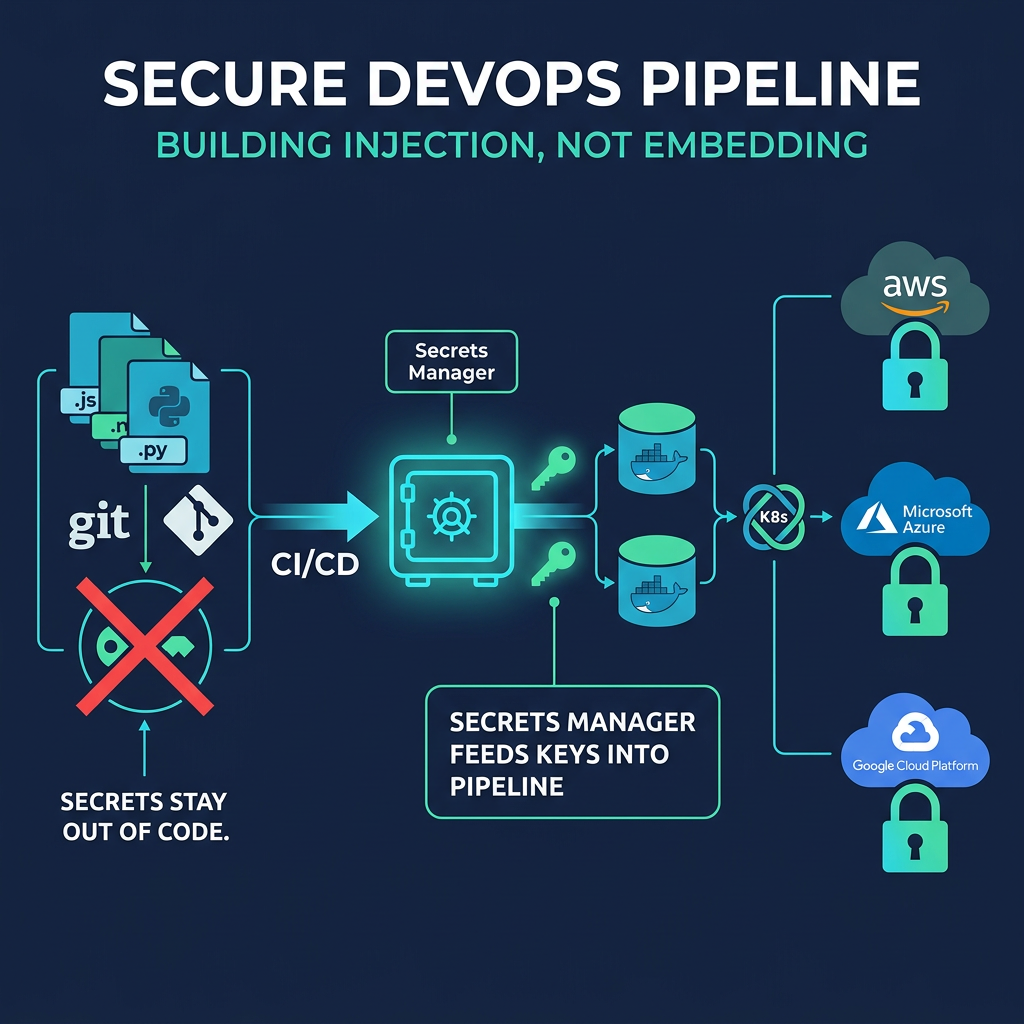
Infrastructure as code (IaC) lets teams define servers, networks, and applications in version-controlled files. That speed and repeatability are a major advantage, but it creates a risk: the same files that describe your infrastructure often need passwords, API keys, and tokens to work. When those credentials end up in code, a single commit can expose your entire environment.
This guide explains how secrets management in DevOps works across IaC, CI/CD pipelines, Docker, Kubernetes, and cloud platforms, and how to keep credentials out of the wrong places.
Passwords vs Secrets: What’s the Difference?
A password usually belongs to a person. A secret is any sensitive credential used by machines, such as API keys, database credentials, tokens, certificates, and SSH keys. Secrets are used by applications, pipelines, and services, often at high volume and with no human involved.
That difference matters. Human passwords can be protected with a team password manager, but machine secrets need lifecycle controls: automated retrieval, rotation, expiry, and auditing.
Why Hardcoded Secrets Are Dangerous
Hardcoding means placing a credential directly in source code, a Terraform file, a Dockerfile, or a pipeline configuration. It is tempting because it works immediately. The problems follow:
- Git history is permanent: Deleting a secret in a later commit does not remove it from earlier ones.
- Repositories get copied: Forks, clones, and backups spread the secret beyond your control.
- Access is too broad: Anyone who can read the repo can read the credential.
- Rotation is painful: Changing a hardcoded secret means editing code and redeploying.
- Leaks are fast: Automated bots scan public repositories for exposed keys within minutes.
This leads to secret sprawl: credentials scattered across repos, pipelines, config files, and chat messages, with no clear owner or inventory.
Core Principles of Secrets Management
Whatever tools you use, these principles apply:
- Never store secrets in code: Keep them in a dedicated secrets manager.
- Use the least privilege: Each service gets only the access it needs.
- Prefer short-lived credentials: Temporary tokens limit the damage of a leak.
- Rotate regularly and automatically.
- Encrypt in transit and at rest.
- Audit every access: Know who or what retrieved which secret, and when.
- Scan continuously: Catch leaks before attackers do.
Secrets in Infrastructure as Code
Terraform
Terraform needs credentials for cloud providers and often handles database passwords. Two points deserve attention:
- State files can contain secrets in plain text. Store state in an encrypted remote backend with strict access controls and never commit it to Git.
- Avoid hardcoding variables. Pull values from a secrets manager at runtime and mark sensitive variables, so they are hidden from output.
Ansible, Pulumi, and others
Ansible Vault and Pulumi’s built-in secret encryption can protect values in configuration, but the encryption keys themselves must be managed carefully. For larger teams, integrating with a central secrets manager is more scalable than passing encrypted files around.
GitOps and encrypted secrets
In GitOps workflows, everything lives in Git, including configuration. Tools like SOPS and Sealed Secrets let teams commit encrypted secrets safely, so only the target cluster or authorized users can decrypt them.
Secrets in CI/CD Pipelines
Pipelines are a prime target because they hold credentials with deployment power. Best practices for CI/CD secrets management include:
- Use the platform’s secret store in GitHub Actions, GitLab CI/CD, Jenkins, CircleCI, or Azure DevOps rather than plain environment variables in config files.
- Use OIDC federation where supported, so pipelines receive short-lived cloud credentials instead of long-lived keys.
- Mask secrets in logs and avoid printing environment variables during debugging.
- Restrict who can edit pipelines. Anyone who can change a workflow can often extract its secrets.
- Limit secret scope to specific repositories, branches, or environments.
Docker Secrets Management
Containers are a common place for accidental exposure.
- Never bake secrets into images. Anything in a Dockerfile layer can be recovered from the image.
- Be careful with environment variables. They are easy to use but can leak through inspection tools, logs, and crash dumps.
- Use Docker secrets with Swarm, or mount secrets as files at runtime, so they stay out of the image and environment.
- Scan images for embedded credentials before pushing to a registry.
Kubernetes Secrets Management
Kubernetes has a native Secret object, but it is often misunderstood. By default, Secrets are only base64-encoded, which is not encryption. To use them safely:
- Enable encryption at rest for etcd.
- Apply RBAC tightly so only the pods and users that need a Secret can read it.
- Avoid exposing Secrets as environment variables where possible; mounted volumes are generally safer.
- Use an external secrets manager such as HashiCorp Vault, AWS Secrets Manager, Azure Key Vault, or Google Secret Manager.
- Sync with the External Secrets Operator so secrets are pulled from your vault into the cluster automatically, without ever living in Git.
Helm charts deserve special attention: values files often contain credentials, so keep them out of repositories or encrypt them.
Cloud-Native Secrets Management
Major cloud providers offer managed services such as AWS Secrets Manager, Azure Key Vault, and Google Secret Manager. They provide encryption, fine-grained IAM access, audit logs, and automatic rotation for supported services. For multi-cloud or hybrid environments, HashiCorp Vault or OpenBao offer a consistent layer across platforms, including dynamic secrets that are generated on demand and expire automatically.
Where possible, use workload identity, such as IAM roles for services, so applications authenticate without any stored credential at all. The safest secret is the one that does not exist.
Detecting and Preventing Leaks
Prevention works best in layers:
- Pre-commit hooks with tools like Gitleaks stop secrets before they enter a repository.
- CI scanning with GitGuardian, Trivy, or similar tools catches what slips through.
- Repository-wide history scans find older exposures.
- Incident playbook: if a secret leaks, treat it as compromised. Revoke and rotate it immediately; deleting the commit is not enough.
Do and Don’t Checklist
| Do | Don’t |
| Store secrets in a dedicated manager | Hardcode credentials in code or IaC |
| Use short-lived, scoped credentials | Share one long-lived key across services |
| Encrypt Terraform state and restrict access | Commit state files to Git |
| Rotate secrets automatically | Wait for an incident to rotate |
| Scan code, images, and history | Assume private repos are safe |
| Log and audit secret access | Leave access unmonitored |
Conclusion
Infrastructure as Code makes deployment faster, but it also makes careless credential handling more costly. The solution is a consistent approach: keep secrets out of code, retrieve them at runtime from a managed vault, give every workload the least access it needs, and automate rotation and scanning. Teams that build these habits early avoid the painful cleanup that follows a leak.
Frequently Asked Questions
What is secrets management in DevOps?
It is the practice of securely storing, distributing, rotating, and auditing the credentials used by applications, pipelines, and infrastructure, such as API keys, tokens, and database passwords.
Why should passwords not be hardcoded in IaC?
Hardcoded credentials live permanently in Git history, spread through clones and forks, are visible to anyone with repo access, and are hard to rotate. They are one of the most common causes of leaks.
What is the difference between a password and a secret?
A password typically authenticates a person. A secret is a broader term for machine credentials such as API keys, tokens, certificates, and service passwords, which need automated rotation and auditing.
Are Kubernetes Secrets encrypted by default?
No. By default they are only base64-encoded. You need to enable encryption at rest, restrict access with RBAC, or use an external secrets manager.
What is the best way to store secrets in Docker?
Avoid baking them into images or relying only on environment variables. Use Docker secrets or mount secrets as files at runtime, and scan images for embedded credentials.
Leave a Reply